You've built your application, containerized it with Docker, and now you're staring at AWS thinking: "Do I use EC2? ECS? Fargate? What's the difference? Why are there so many options?"
I feel you.
Here's the thing: AWS gives you three main ways to run containers, and each one makes sense in different situations. Picking the wrong one is like buying a motorbike when you needed a pickup truck - it'll technically work, but you'll be making multiple trips and cursing your decisions.
New to AWS? Start with AWS for beginners to understand core services before diving into compute options.
Let me break down each option, when to use them, and save you from expensive mistakes.
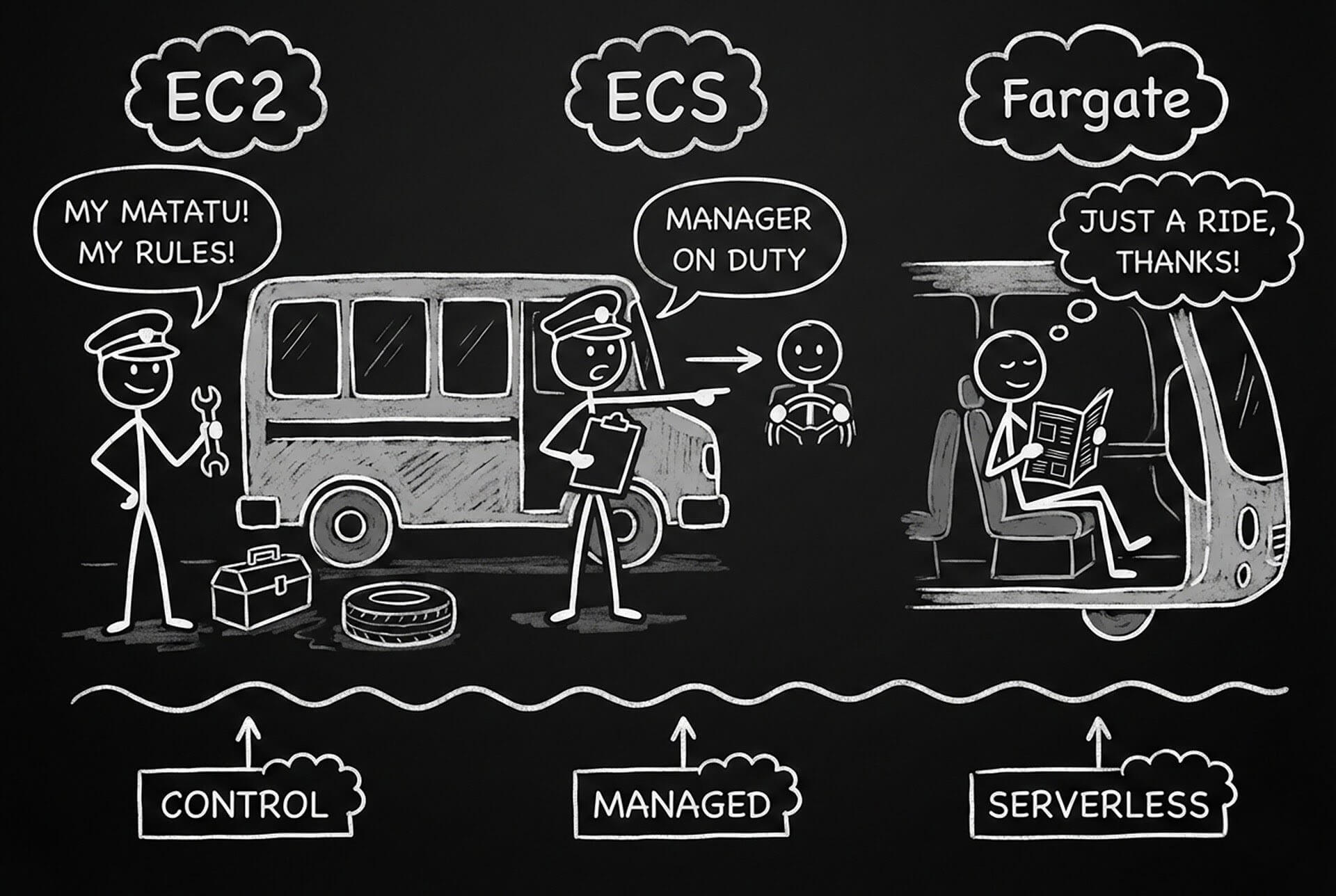
The Matatu Analogy
EC2: You buy your own matatu. Full control - choose the seats, paint job, route, driver, everything. But you maintain it, fuel it, insure it, and deal with breakdowns. Maximum flexibility, maximum responsibility.
ECS on EC2: You still own the matatu, but you hire a manager (ECS) to handle scheduling, route optimization, and passenger management. You focus on the business, manager handles operations.
Fargate: You don't own any vehicles. You just pay per passenger transported. Someone else owns the matatus, maintains them, fuels them. You just specify "I need to move 50 passengers" and it happens. Zero infrastructure management.
If you need a refresher on cloud computing concepts explained simply.
Let's dive deeper.
EC2: Full Control, Full Responsibility
Amazon Elastic Compute Cloud - virtual machines in the cloud.
What it is: You provision virtual servers (instances), install Docker, and run your containers manually or with orchestration tools like Docker Compose or Kubernetes.
When to use it:
- You need full OS-level control
- Running high-performance computing (HPC) workloads
- Machine learning training with GPUs
- Applications requiring specific kernel modules or system configurations
- Long-running, predictable workloads where Reserved Instances save money
Real-world example: ML model training
# Launch GPU-enabled EC2 instance for ML training
aws ec2 run-instances \
  --image-id ami-0c55b159cbfafe1f0 \
  --instance-type p3.2xlarge \
  --key-name my-key-pair \
  --security-group-ids sg-0123456789abcdef \
  --subnet-id subnet-0123456789abcdef \
  --user-data '#!/bin/bash
nvidia-docker run --gpus all \
  -v /data:/data \
  tensorflow/tensorflow:latest-gpu \
  python /data/train_model.py'
Pros:
- Maximum control: Configure anything at OS level
- Widest instance selection: 500+ instance types including specialized hardware (GPUs, FPGAs, high-memory, etc.)
- Cost-effective for steady workloads: Reserved Instances offer up to 72% savings
- No ECS/Fargate limitations: No memory limits, no CPU constraints
- Persistent storage: Easy to attach EBS volumes
Cons:
- You manage everything: Patching, security updates, scaling, monitoring
- Capacity planning nightmare: Need to predict future load
- Slower scaling: Takes minutes to launch new instances
- Idle costs: Pay for full instance even if containers aren't using all resources
- More complex: Need to handle orchestration yourself
Cost example:
- t3.medium: $0.0416/hour = ~$30/month
- Running 24/7, even at 10% utilization
- Reserved Instance: ~$8/month (1-year commitment)
ECS: Managed Container Orchestration
Amazon Elastic Container Service - AWS's native container orchestration.
What it is: You define containers and their requirements. ECS handles scheduling, placement, scaling, and health checks. Can run on EC2 instances you manage OR on Fargate (serverless).
When to use it:
- Containerized microservices architecture
- You want orchestration but not Kubernetes complexity
- Need tight AWS integration (ALB, CloudWatch, IAM, etc.)
- Multiple services with different scaling patterns
- Batch jobs and scheduled tasks
Real-world example: Web application with ECS on EC2
# task-definition.json
{
  "family": "web-app",
  "networkMode": "awsvpc",
  "containerDefinitions": [
    {
      "name": "app",
      "image": "mycompany/web-app:latest",
      "cpu": 256,
      "memory": 512,
      "essential": true,
      "portMappings": [
        {
          "containerPort": 3000,
          "protocol": "tcp"
        }
      ],
      "environment": [
        {
          "name": "NODE_ENV",
          "value": "production"
        }
      ],
      "logConfiguration": {
        "logDriver": "awslogs",
        "options": {
          "awslogs-group": "/ecs/web-app",
          "awslogs-region": "us-east-1",
          "awslogs-stream-prefix": "app"
        }
      },
      "healthCheck": {
        "command": ["CMD-SHELL", "curl -f http://localhost:3000/health || exit 1"],
        "interval": 30,
        "timeout": 5,
        "retries": 3,
        "startPeriod": 60
      }
    }
  ],
  "requiresCompatibilities": ["EC2"],
  "cpu": "256",
  "memory": "512"
}
Register the task definition:
aws ecs register-task-definition \
  --cli-input-json file://task-definition.json
Create ECS cluster with EC2 instances:
# Create cluster
aws ecs create-cluster --cluster-name web-app-cluster

# Launch EC2 instances that join the cluster
aws ec2 run-instances \
  --image-id ami-0c55b159cbfafe1f0 \
  --instance-type t3.medium \
  --iam-instance-profile Name=ecsInstanceRole \
  --user-data '#!/bin/bash
echo ECS_CLUSTER=web-app-cluster >> /etc/ecs/ecs.config'
Create ECS service:
aws ecs create-service \
  --cluster web-app-cluster \
  --service-name web-app-service \
  --task-definition web-app:1 \
  --desired-count 3 \
  --launch-type EC2 \
  --load-balancers targetGroupArn=arn:aws:elasticloadbalancing:...,containerName=app,containerPort=3000
Pros:
- Automatic orchestration: Handles container placement, scaling, health checks
- Native AWS integration: Works seamlessly with ALB, CloudWatch, IAM, Secrets Manager
- Simpler than Kubernetes: Less configuration, easier learning curve
- Cost-effective with EC2: Use Spot Instances or Reserved Instances
- Service discovery: Built-in service mesh and discovery
Cons:
- Still managing infrastructure: With EC2 launch type, you manage the instances
- ECS-specific knowledge: Skills don't transfer to other platforms
- Less flexibility than Kubernetes: Fewer third-party tools and integrations
Cost example (ECS on EC2):
- Same as EC2 costs (ECS control plane is free)
- t3.medium: $30/month
- But better resource utilization - pack multiple containers on same instance
Fargate: Serverless Containers
AWS Fargate - serverless compute for containers.
What it is: You define container specs (CPU, memory, image). AWS handles everything else - no servers to manage, provision, or scale. True pay-per-use.
When to use it:
- Getting started with containers, lack infrastructure expertise
- Unpredictable or spiky traffic patterns
- Event-driven applications (APIs, webhooks, scheduled tasks)
- Microservices where each service scales independently
- Want operational simplicity over cost optimization
- Development and staging environments
Real-world example: API microservice with Fargate
# fargate-task-definition.json
{
  "family": "api-service",
  "networkMode": "awsvpc",
  "requiresCompatibilities": ["FARGATE"],
  "cpu": "256",
  "memory": "512",
  "containerDefinitions": [
    {
      "name": "api",
      "image": "mycompany/api:latest",
      "portMappings": [
        {
          "containerPort": 8080,
          "protocol": "tcp"
        }
      ],
      "environment": [
        {
          "name": "PORT",
          "value": "8080"
        }
      ],
      "secrets": [
        {
          "name": "DATABASE_URL",
          "valueFrom": "arn:aws:secretsmanager:us-east-1:123456789012:secret:db-url"
        }
      ],
      "logConfiguration": {
        "logDriver": "awslogs",
        "options": {
          "awslogs-group": "/ecs/api-service",
          "awslogs-region": "us-east-1",
          "awslogs-stream-prefix": "api"
        }
      }
    }
  ],
  "executionRoleArn": "arn:aws:iam::123456789012:role/ecsTaskExecutionRole",
  "taskRoleArn": "arn:aws:iam::123456789012:role/ecsTaskRole"
}
Deploy to Fargate:
# Register task definition
aws ecs register-task-definition \
  --cli-input-json file://fargate-task-definition.json

# Create Fargate service with auto-scaling
aws ecs create-service \
  --cluster api-cluster \
  --service-name api-service \
  --task-definition api-service:1 \
  --desired-count 2 \
  --launch-type FARGATE \
  --network-configuration "awsvpcConfiguration={subnets=[subnet-12345],securityGroups=[sg-12345],assignPublicIp=ENABLED}" \
  --load-balancers targetGroupArn=arn:aws:elasticloadbalancing:...,containerName=api,containerPort=8080

# Set up auto-scaling
aws application-autoscaling register-scalable-target \
  --service-namespace ecs \
  --resource-id service/api-cluster/api-service \
  --scalable-dimension ecs:service:DesiredCount \
  --min-capacity 2 \
  --max-capacity 10

aws application-autoscaling put-scaling-policy \
  --policy-name cpu-scaling \
  --service-namespace ecs \
  --resource-id service/api-cluster/api-service \
  --scalable-dimension ecs:service:DesiredCount \
  --policy-type TargetTrackingScaling \
  --target-tracking-scaling-policy-configuration file://scaling-policy.json
Pros:
- Zero infrastructure management: No servers, no patching, no capacity planning
- True pay-per-use: Only pay for CPU/memory used while containers run
- Fast scaling: Launches containers in seconds
- Perfect for spiky traffic: Scales down to zero cost during idle periods
- Predictable pricing: No surprise costs from idle resources
- Security: AWS patches and secures underlying infrastructure
Cons:
- Higher per-hour costs: ~40-80% more expensive than equivalent EC2
- Cold starts: Initial container launch takes 30-60 seconds
- Resource limits: Max 16 vCPU, 120GB memory per task
- Less control: Can't access underlying instances or install custom software
- Not ideal for steady workloads: EC2 Reserved Instances are cheaper for 24/7 workloads
Cost example:
- 0.25 vCPU, 0.5GB RAM
- Running 24/7: ~$15/month
- Running 8 hours/day: ~$5/month (this is where Fargate shines)
The Decision Matrix
Choose EC2 if:
- [ ] Need full OS control or specialized hardware
- [ ] Running GPU/FPGA workloads
- [ ] Predictable, steady, 24/7 workloads
- [ ] Have DevOps team to manage infrastructure
- [ ] Want maximum cost optimization (Reserved/Spot Instances)
- [ ] Require specific kernel modules or system configurations
Choose ECS on EC2 if:
- [ ] Want container orchestration but not Kubernetes complexity
- [ ] Multiple microservices with varying resource needs
- [ ] Predictable traffic where you can right-size instances
- [ ] Want better resource utilization than single containers on EC2
- [ ] Have some DevOps capacity for infrastructure management
- [ ] Need cost optimization with Reserved Instances
Choose Fargate if:
- [ ] Want zero infrastructure management
- [ ] Unpredictable or spiky traffic patterns
- [ ] Building event-driven architecture
- [ ] Small to medium workloads
- [ ] Development/staging environments
- [ ] Starting with containers, lack infrastructure expertise
- [ ] Microservices where each scales independently
- [ ] Value operational simplicity over cost
Cost Comparison: Real Numbers
Scenario: Web API with moderate traffic (500 req/min avg)
Requirements:
- 2 vCPU, 4GB RAM
- Running 24/7
- 3 availability zones for redundancy
EC2 Costs:
- 3x t3.medium instances (2 vCPU, 4GB each)
- On-demand: 3 × $30 = $90/month
- Reserved (1-year): 3 × $18 = $54/month
- With 70% Spot Instances: $40/month
ECS on EC2 Costs:
- Same as EC2 (ECS control plane is free)
- Better utilization: 2x t3.medium = $60/month on-demand
- Reserved: $36/month
Fargate Costs:
- 2 vCPU, 4GB per task × 3 tasks
- $126/month (24/7 operation)
- But scales to zero during low traffic
Winner for 24/7 steady load: EC2 with Reserved Instances ($54/month)
Winner for unpredictable load: Fargate (only pay when running)
Winner for balanced approach: ECS on EC2 with Spot ($40-60/month)
Performance Comparison
Benchmarks (same workload, CPU-bound API):
| Metric | EC2 | ECS (EC2) | Fargate |
|---|---|---|---|
| Cold start | 60-120s | 30-60s | 30-60s |
| Warm start | 0s | 0s | 0s |
| Request latency | 45ms | 48ms | 52ms |
| Throughput | 2000 req/s | 1900 req/s | 1800 req/s |
| Scaling time | 3-5 min | 1-2 min | 30-60s |
Takeaway: Performance differences are minimal for most workloads. Scaling speed matters more.
Migration Path: Which One First?
Starting from scratch?
- Start with Fargate - fastest path to production
- Learn container patterns without infrastructure complexity
- If costs become significant, migrate to ECS on EC2
- Only move to pure EC2 if you need specialized control
Already on EC2?
- Containerize applications with Docker
- Move to ECS on EC2 - keeps your existing instances
- Gradually adopt Fargate for services with spiky traffic
- Use hybrid approach - Fargate for dev, ECS on EC2 for production
The Hybrid Approach (What Most Companies Do)
Smart companies use all three:
- Fargate for:
- Development/staging environments - Scheduled batch jobs - Event-driven services (triggered by S3, SQS, etc.) - Low-traffic microservices
- ECS on EC2 for:
- Production web applications - Steady-load microservices - Services needing GPU (g4dn instances)
- EC2 for:
- Machine learning training - Data processing pipelines - Legacy applications not yet containerized - Workloads requiring specific system configurations
Quick Start: Deploying Your First Container
Fargate (simplest):
# 1. Create cluster
aws ecs create-cluster --cluster-name my-app

# 2. Register task definition (use JSON above)
aws ecs register-task-definition --cli-input-json file://task.json

# 3. Run task
aws ecs run-task \
  --cluster my-app \
  --launch-type FARGATE \
  --task-definition my-app:1 \
  --network-configuration "awsvpcConfiguration={subnets=[subnet-abc123],assignPublicIp=ENABLED}"
Done. Your container is running. No servers to manage.
The Bottom Line
EC2 = Maximum control, maximum responsibility. Best for specialized workloads and predictable traffic with cost optimization.
ECS on EC2 = Orchestration without Kubernetes complexity. Best for microservices with steady traffic where you want control and cost efficiency.
Fargate = Zero infrastructure management. Best for unpredictable workloads, getting started quickly, and valuing simplicity over cost.
Real talk: Most companies use a hybrid approach. Start with Fargate for speed, optimize with ECS on EC2 for cost, use plain EC2 for specialized needs.
The "best" choice depends on your team's expertise, traffic patterns, and whether you optimize for developer time or infrastructure costs.
Now you know when to buy the matatu, when to hire a manager, and when to just pay per passenger. Choose wisely.
Sources:
- AWS Fargate vs. Amazon EC2: Launch Options for AWS ECS
- AWS EC2 Vs ECS Vs ECS Fargate: Comparing Performance And Costs
- Fargate vs EC2: Choosing the Right Launch Type for Your ECS Workloads
- EC2 vs. Fargate: Understanding the Differences and Choosing the Best for ECS
- Comparing Amazon ECS launch types: EC2 vs. Fargate