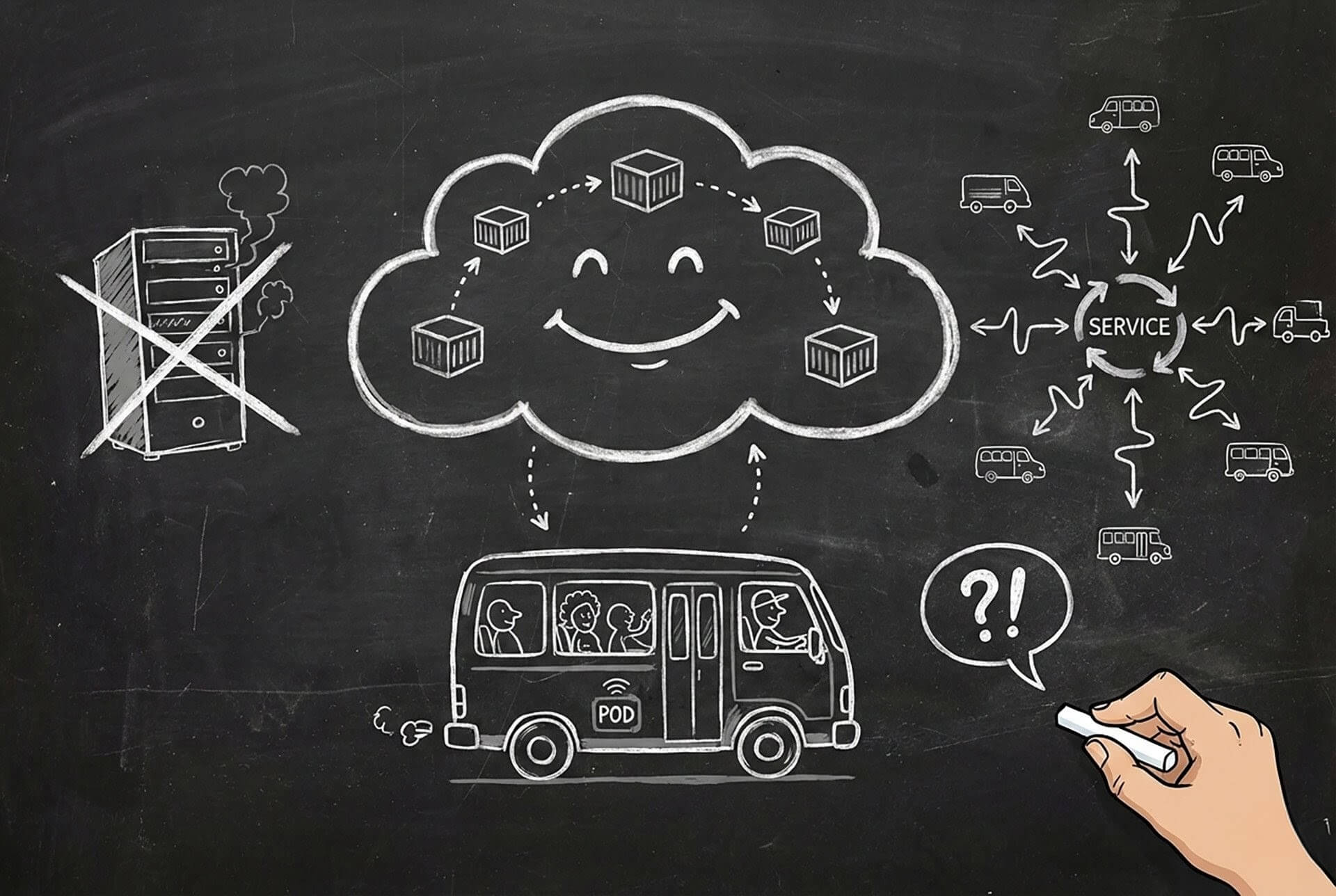
For years, Kubernetes was that scary thing only DevOps engineers touched. Developers would write code, push to Git, and pray that the deployment gods (SRE team) would make it work in production.
Yo, 2025 hit different. Now if you can't read a Kubernetes manifest or debug why your Pod is stuck in CrashLoopBackOff, you're like that developer still using FTP to deploy websites. Technically you exist, but why?
This guide is for developers who want to understand K8s without getting a PhD in distributed systems. Let's demystify this thing.
If you're coming from Docker Compose workflows, you'll find many familiar concepts here, just orchestrated at cloud scale.
First: Stop Thinking About Servers
The hardest part of learning Kubernetes is unlearning everything about servers.
Old Way: "Deploy this to server 10.0.1.45."
Kubernetes Way: "I need 3 copies of this app running. I don't care where."
Kubernetes is like a Matatu SACCO. You don't tell passengers "sit in seat 14A of matatu KCB 123X." You just say "we need 3 matatus running the Westlands route." The SACCO (well, logically) decides which specific matatus run, and if one breaks down, they send another (we're still being logical). Really bad example, but that's Kubernetes.
The Essential Concepts (In English, Not Cloud-Speak)
1. Cluster
The whole operation. Like an entire Matatu SACCO. Made of multiple servers (Nodes) that work together.
2. Node
A single server/machine in your cluster. Like one matatu. You usually don't care about individual nodes unless something is broken.
3. Pod
The smallest deployable unit. This is the confusing part because you'd think it's "container," but no. A Pod wraps one or more containers.
Think of it like this: A container is a person. A Pod is a boda boda. Usually, it's one person on one boda (1 container in 1 Pod), but sometimes you have a passenger (sidecar container). They share the same ride (same Pod), same network IP, can talk to each other instantly.
4. Deployment
The manager. You tell it: "I want 3 replicas of my app running." It creates 3 Pods. If one crashes, it immediately starts a new one.
This is like telling a boda stage, "I need 3 bodas always available." If one gets a puncture, another replaces it automatically. Tuko pamoja Mhesh?
5. Service
The stable address. Pods die and restart constantly. Their IP addresses change. A Service gives you a permanent address.
Example: Instead of telling customers "today the boda is parked at GPS coordinates -1.2345, 36.6789," you say "come to the Kilimani boda stage." The stage location doesn't change, even if the specific bodas do.
6. Ingress
The front door for external traffic. Routes api.mwangi.co.ke to your internal Services.
Your New Best Friend: kubectl
kubectl (pronounced "kube-control" or "kube-cuddle" if you're feeling cute) is your command-line tool.
The Commands You'll Use 47 Times a Day:
# See everything
kubectl get all

# See just Pods
kubectl get pods

# See WHY a Pod is failing
kubectl describe pod my-app-xyz123

# Watch logs (like tail -f, but cloud)
kubectl logs -f my-app-xyz123

# SSH into a running container
kubectl exec -it my-app-xyz123 -- /bin/sh

# Apply changes from a YAML file
kubectl apply -f deployment.yaml

# Delete everything defined in a file
kubectl delete -f deployment.yaml
Pro tip: When something breaks (and it will), describe first, THEN check logs. describe tells you if the Pod even started. Logs only work if the container is actually running.
Let's Deploy Something Real
Enough theory. Let's deploy a simple API.
Step 1: The Deployment YAML
Create deployment.yaml:
apiVersion: apps/v1
kind: Deployment
metadata:
  name: mwangi-api
  labels:
    app: mwangi-api
spec:
  replicas: 3  # We want 3 copies running
  selector:
    matchLabels:
      app: mwangi-api  # This MUST match the template labels below
  template:
    metadata:
      labels:
        app: mwangi-api
    spec:
      containers:
      - name: api
        image: nginx:latest  # Replace with your actual image (use multi-stage builds)
        ports:
        - containerPort: 80
        resources:
          # ALWAYS set these. Don't be that person who crashes the cluster
          requests:
            memory: "128Mi"
            cpu: "250m"  # 1/4 of a CPU core
          limits:
            memory: "256Mi"
            cpu: "500m"
        env:
        - name: ENVIRONMENT
          value: "production"
        - name: PORT
          value: "80"
Apply it:
kubectl apply -f deployment.yamlWatch your Pods come to life:
kubectl get pods -wStep 2: The Service YAML
Your Pods are running, but they're not accessible. Create service.yaml:
apiVersion: v1
kind: Service
metadata:
  name: mwangi-api-service
spec:
  selector:
    app: mwangi-api  # Must match your Deployment labels
  ports:
    - protocol: TCP
      port: 80        # Port exposed by the Service
      targetPort: 80  # Port the container is listening on
  type: ClusterIP    # Internal only
Service Types (Pick Your Visibility):
- ClusterIP - Internal only. Other Pods can reach it, but not the outside world. Like a WhatsApp group.
- NodePort - Exposes on every Node's IP. Good for local development. Like a public matatu stage.
- LoadBalancer - Asks your cloud provider (AWS/GCP/Azure) for a real load balancer. Costs money. Like hiring a bouncer for your club.
If you're deciding between K8s and AWS-native container services, read EC2 vs ECS vs Fargate comparison to understand the trade-offs.
Apply it:
kubectl apply -f service.yamlConfiguration: Stop Hardcoding Like It's 2010
ConfigMaps (For Non-Sensitive Config)
apiVersion: v1
kind: ConfigMap
metadata:
  name: app-config
data:
  DATABASE_URL: "postgres://db.internal:5432/myapp"
  CACHE_TTL: "3600"
  FEATURE_DARK_MODE: "true"
Secrets (For Passwords and Keys)
apiVersion: v1
kind: Secret
metadata:
  name: app-secrets
type: Opaque
stringData:  # This auto-encodes to base64
  API_KEY: "sk-super-secret-key-abc123"
  DB_PASSWORD: "notpassword123"
Inject Them Into Your Deployment
Update your Deployment:
spec:
  containers:
  - name: api
    envFrom:
    - configMapRef:
        name: app-config
    - secretRef:
        name: app-secrets
Now your app gets those environment variables automatically. Change the ConfigMap? Roll out new Pods. No rebuilding Docker images just to change a config value.
Keep your images small and secure with Docker multi-stage builds - especially important for K8s where image pull times directly impact scaling speed.
Autoscaling: Because 3AM Traffic Spikes Are Real
Why pay for 10 Pods at 3AM when nobody's using your app? Let Kubernetes scale for you.
apiVersion: autoscaling/v2
kind: HorizontalPodAutoscaler
metadata:
  name: mwangi-api-hpa
spec:
  scaleTargetRef:
    apiVersion: apps/v1
    kind: Deployment
    name: mwangi-api
  minReplicas: 2
  maxReplicas: 20
  metrics:
  - type: Resource
    resource:
      name: cpu
      target:
        type: Utilization
        averageUtilization: 70  # Scale up if CPU > 70%
This is like telling a Matatu SACCO (that is, if you could): "Always have at least 2 matatus during off-peak, but send up to 20 during rush hour if needed."
Proper autoscaling configuration is crucial for cloud cost optimization - don't pay for resources you're not using.
Troubleshooting: When Things Go Wrong
Because they will. Here's your field guide:
Problem: CrashLoopBackOff
Your container starts, crashes, Kubernetes tries again, crashes, tries again... forever.
Diagnosis:
kubectl logs my-pod-xyz --previous  # Check logs from the LAST run
kubectl describe pod my-pod-xyz     # Check events
Common Causes:
- Missing environment variable (check your Secrets/ConfigMaps)
- Wrong command in your Dockerfile CMD
- App crashes immediately (bad code, boss)
Problem: ImagePullBackOff
Kubernetes can't download your Docker image.
Diagnosis:
kubectl describe pod my-pod-xyzLook for "Failed to pull image" in events.
Common Causes:
- Typo in image name (happens more than we admit)
- Private registry but no credentials configured
- Image doesn't exist (did you forget to push it?)
Problem: Pending
Pod is created but never starts.
Diagnosis:
kubectl describe pod my-pod-xyzCommon Causes:
- Insufficient resources (your cluster is full)
- Your
resources.requestsare too high (asking for 64GB RAM on a 16GB cluster) - Node selector/affinity rules are too restrictive
Local Development: Don't Test in Production
Use kind (Kubernetes in Docker) for local development:
# Install kind
brew install kind  # macOS
# or download from https://kind.sigs.k8s.io/

# Create a local cluster
kind create cluster --name mwangi-dev

# Your kubectl now points to this local cluster
kubectl cluster-info

# When done
kind delete cluster --name mwangi-dev
The Cheat Sheet You'll Screenshot
# Context switching (if you have multiple clusters)
kubectl config get-contexts
kubectl config use-context production  # BE CAREFUL

# Quick Pod creation for testing
kubectl run test-pod --image=nginx --rm -it -- /bin/sh

# Port forwarding (access a Pod locally)
kubectl port-forward pod/my-pod 8080:80
# Now access http://localhost:8080

# Get resource usage
kubectl top pods
kubectl top nodes

# Edit a resource on the fly (not recommended for prod)
kubectl edit deployment mwangi-api

# Rollback a bad deployment
kubectl rollout undo deployment/mwangi-api

# Check rollout status
kubectl rollout status deployment/mwangi-api
The Bottom Line
Kubernetes isn't magic, it's just abstraction. You're not managing servers anymore; you're declaring desired state and letting the system figure out how to achieve it.
K8s portability is one of its biggest advantages - run the same manifests on AWS, GCP, or Azure. Learn more about multi-cloud strategies and avoiding vendor lock-in.
Wondering when to use containers vs serverless? Read Serverless Computing: No Servers, Big Lies for an honest comparison.
Four YAMLs to Rule Them All:
- Deployment - Defines HOW your app runs
- Service - Defines HOW to reach your app
- ConfigMap/Secret - Defines CONFIGURATION
- HPA - Defines SCALING rules
Master these, and you're no longer "just a developer." You're a developer who understands production. And that's a superpower in 2025.
Running microservices on K8s? Check out Spring Boot microservices with Eureka for service discovery patterns that complement K8s Services.
And remember, when it breaks (not if, WHEN), remember: kubectl describe first, then logs, then Google. In that order. If you get stuck, you can always ask MWANGI.